
TX Toolbox1.6.9 - Google Play
You'll be able to see results in few seconds.
Publisher Description
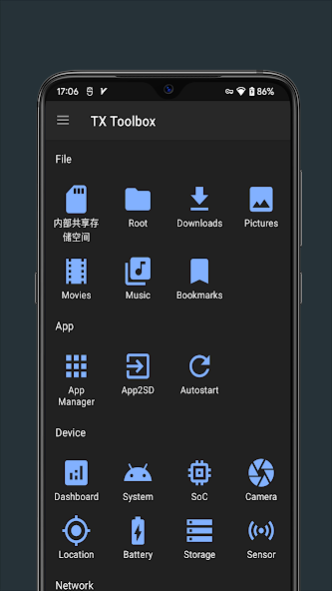
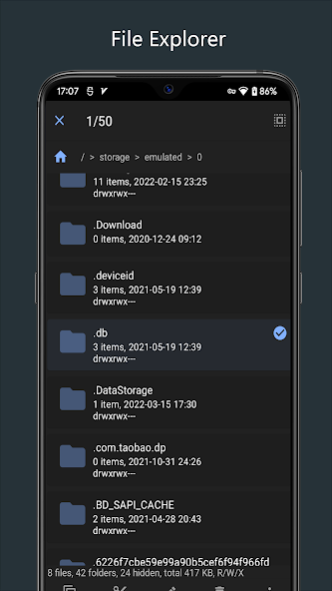
TX Toolbox is a simple and very efficient and powerful App for not only normal users but also for developers.
It is packed with many useful features like CPU, RAM, OS, Sensors, Storage, Battery, Camera, WiFi,Wake on LAN and
so on. It's less than 10MB APK size. Many powerful features will be added in the future, please install and share it to your friends!
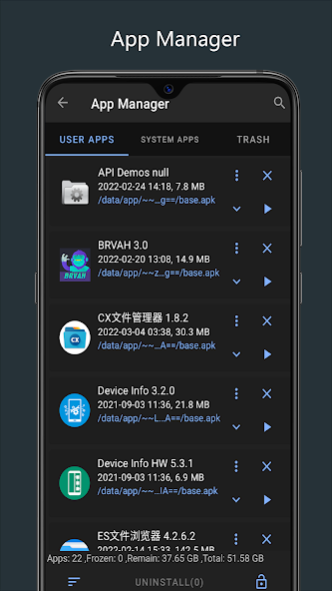
App manager
- Display user apps, system apps and trash;
- Main functions such as uninstall, restore, backup and freeze;
- App details info: package name, code size, data size, cache size etc;
- Support sorting by size, name, path, etc., and full-text search by app name, path or package name etc.
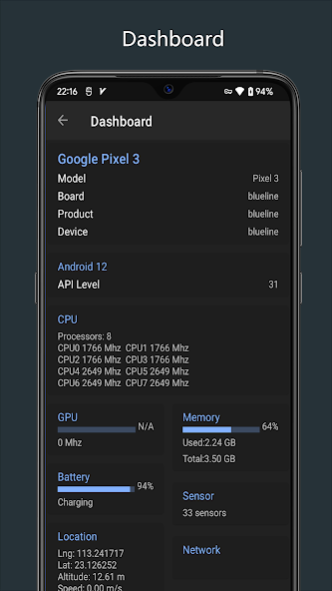
Dashboard
- Device
- OS
- Soc(CPU/GPU)
- RAM
- Storage
- Location
- Battery
- Sensors
- Network
System
- Android system info like version、API level、build version、build date etc..
- Java runtime info like version、vendor、classpath.
- Dalvik VM info like vendor、runtime、heap size.
- DRM info about the phone.
SoC
- CPU info like model、archiecture、processors clock speed etc.
- GPU info like vendor、frequency etc.
Camera
- Facing
- Resolution
- Focal length
- Aperture
- Flash
- ISO
- Face detect mode
- Sensor size
- Orientation
- AWB lock
- AWB modes
Location
- Hardware
- Coordinate
- Provider
- Accuracy
- Longitude
- Latitude
- Altitude
- Speed
- Address
- Satellite
Battery
- Health
- Plugged
- Voltage
- Technology
- Capacity
- Design capacity
- Status
Storage
- RAM info
- Storage info
Sensors
- All sensors of the phone
- Name
- Vendor
- Power
- Resolution
- Status
WiFi
- SSID
- BSSID
- NetworkID
- Channel
- Frequency
- Security
- WiFi Stander
Wake on LAN
- Wake you PC up on LAN/WAN
VPN
- VPN shortcut to your system VPN settings
Permissions
ACCESS_FINE_LOCATION
ACCESS_COARSE_LOCATION
use for location sensor and info.
INTERNET
ACCESS_NETWORK_STATE
ACCESS_WIFI_STATE
CHANGE_WIFI_STATE
use for speed display and WiFi manager.
CAMERA
get Camera info.
READ_EXTERNAL_STORAGE
WRITE_EXTERNAL_STORAGE
use for storage info.
ACTIVITY_RECOGNITION
get activity recognition sensor Info.
About TX Toolbox
The company that develops TX Toolbox is TX Tech. The latest version released by its developer is 1.6.9.
To install TX Toolbox on your Android device, just click the green Continue To App button above to start the installation process. The app is listed on our website since 2023-06-15 and was downloaded 0 times. We have already checked if the download link is safe, however for your own protection we recommend that you scan the downloaded app with your antivirus. Your antivirus may detect the TX Toolbox as malware as malware if the download link to com.easyapps.txtoolbox is broken.
How to install TX Toolbox on your Android device:
- Click on the Continue To App button on our website. This will redirect you to Google Play.
- Once the TX Toolbox is shown in the Google Play listing of your Android device, you can start its download and installation. Tap on the Install button located below the search bar and to the right of the app icon.
- A pop-up window with the permissions required by TX Toolbox will be shown. Click on Accept to continue the process.
- TX Toolbox will be downloaded onto your device, displaying a progress. Once the download completes, the installation will start and you'll get a notification after the installation is finished.
Program Details
System requirements
Download information
Pricing
Version History
version 1.6.9
posted on 2023-06-15
- Fixed: FC at startup
version 1.6.7
posted on 2023-04-11
- Modify: privacy policy
- Optimization: code;
version 1.6.6
posted on 2022-06-27
- Fixed: Dashboard gps info update issue;
- Optimization: GPS Satellite list display speed;
- Optimization: App manage list loading performance;
version 1.6.5
posted on 2022-04-11
- Added: Audio file cover analysis display;
- Added: More menu operations on the right side of a single file;
- Added: copy and search filename;
- Fixed: Language and theme switching could not follow the system;
- Fix: New file strong close problem;
- Fix: Dashboard network speed display problem;
- Optimization: UI display;
- Optimization: some feature performance issues;
- Optimization: file operation result prompt;
- Optimization: App management app size permission prompt method;
version 1.6.0
posted on 2022-03-17
- Restore:file explorer feature and make it better;
- Fixed: no subject and content when feedback;
- Optimize: the time display format of AppManager;
version 1.5.4
posted on 2021-12-05
- Add:battery charge and discharge current;
- Add: battery design capacity and rated capacity;
- Optimize: battery info display;
version 1.5.3
posted on 2021-10-27
- Restore APP2SD function;
- Adding social media links in about menu;
- Fix some UI display issues;
version 1.5.2
posted on 2021-08-28
- Adapt to Android 11 storage logic
- Added version update history
- Add language settings
- Optimize the problem of sharing file names
- Fix the problem that the restored files in the recycle bin were deleted by mistake
version 1.5.1
posted on 2021-07-28
- Added Android TV supported;
- Added the first screen setting at startup;
- Added traditional chinese support;
- Optimized permission acquisition logic;
- Fixed FC of location setting;
- Fixed issue of repeated display item of trash;
version 1.5.0
posted on 2021-07-20
- Restore the app manager feature of the older version.
- Add VPN shortcut of the system VPN settings.
Disclaimer
Official Google Play Link
We do not host TX Toolbox on our servers. We did not scan it for viruses, adware, spyware or other type of malware. This app is hosted by Google and passed their terms and conditions to be listed there. We recommend caution when installing it.
The Google Play link for TX Toolbox is provided to you by apps112.com without any warranties, representations or guarantees of any kind, so access it at your own risk.
If you have questions regarding this particular app contact the publisher directly. For questions about the functionalities of apps112.com contact us.
